Billing and invoices
Start a plan with a 3-day free trial, change it, buy LiteTunnel™ data, manage the card, view invoices, and stop renewal.
On this page
Use Plan & billing for Clout Browser payments. The workspace owner manages the plan and buys data. If you are a teammate, ask the owner to make the change.
Buy a plan
- Open Plan & billing.
- Choose Monthly, Quarterly or Yearly above the plan cards.
- On the plan you want, pick a profile count under Profiles.
- Select the plan's button and complete payment through Stripe.
Every plan has every feature. Bigger plans add profiles, computers, seats and LiteTunnel™ data; the pricing page lists them. Each month of any plan includes its LiteTunnel™ allowance.
Free trial
A workspace that has never had a Clout Browser plan starts its first plan on a 3-day free trial. The plan buttons read Try … free, Stripe takes the card, and nothing is charged that day.
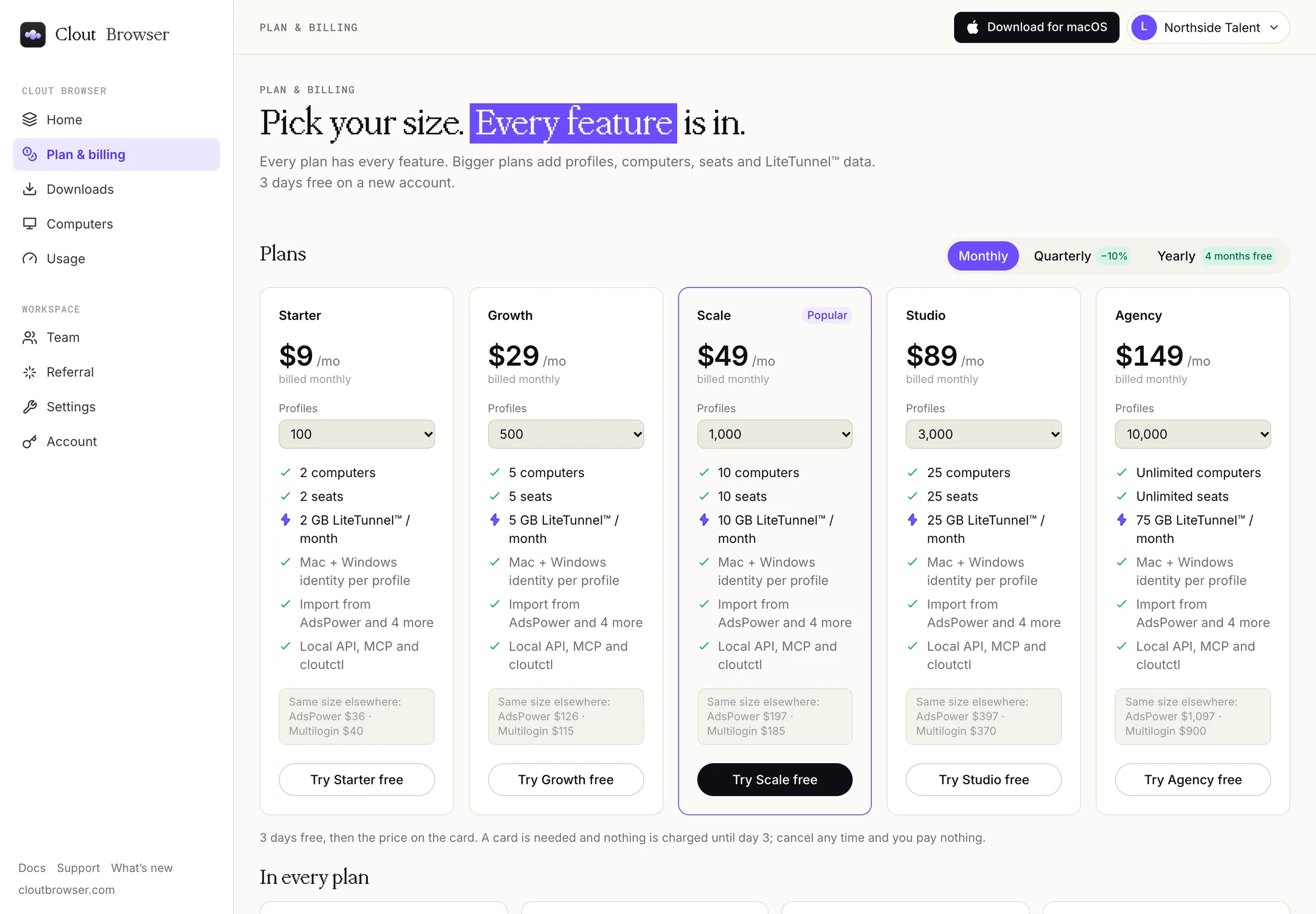
- The trial gives you the plan you chose, with up to 2 GB of LiteTunnel™ data. Packs bought during the trial add to it.
- On day 3 the plan starts and the card is charged for the period you picked, unless you cancel before then. Cancelled during the trial, you pay nothing.
- Home shows how many days are left in the trial and the date the plan renews.
- One trial per workspace and per card. A card that has already had a trial is charged when checkout completes, as a plan without a trial would be.
- A plan bought together with a LiteTunnel™ pack is paid that day, without the trial.
The starter browser in Clout Browser stays free with or without a plan: one profile with a fingerprint fitted to your computer and no proxy. Home shows You are on the free starter profile until you pick a plan.
Change a plan
On Plan & billing, your plan is marked Current. To change it, pick the term and profile count you want and select the other plan's Get … button.
An existing subscription is changed in place: the difference is prorated to the day and invoiced straight away. A successful change also clears a scheduled cancellation. Check Plan & billing before repeating the purchase.
If your plan was set up for you by hand, Plan & billing says so. Talk to us before arranging a replacement.
LiteTunnel™ data
LiteTunnel™ data on Plan & billing shows what is left and sells packs of 20, 100 and 500 GB. Packs never expire. Select Buy 20 GB (or another size) to pay for one through Stripe.
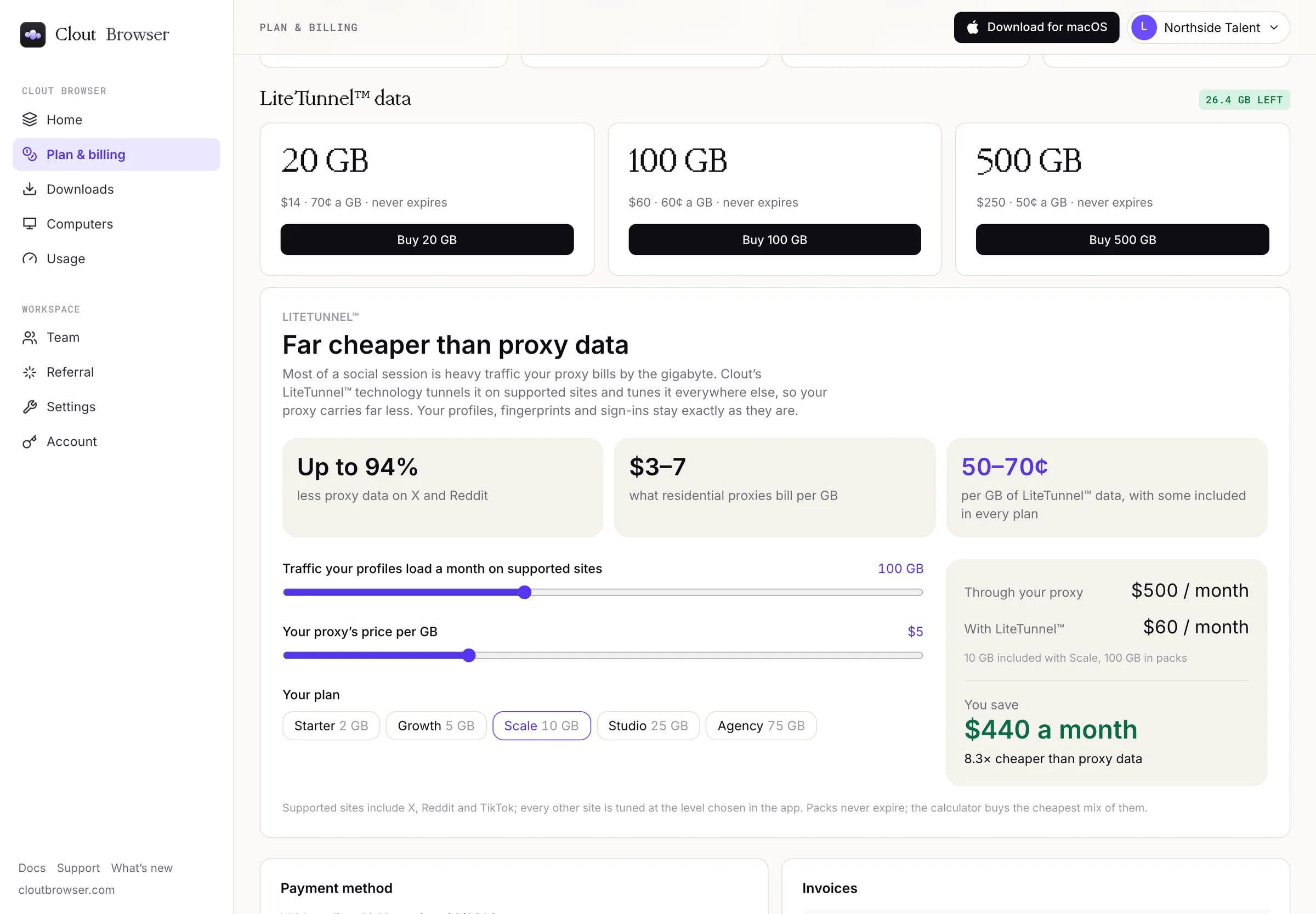
When the allowance and packs run out, LiteTunnel™ pauses and browsing keeps working through your proxies.
Card and invoices
Cards and invoices, at the top of Plan & billing, and Update card or cancel, under Payment method, open Stripe's customer portal. Stripe holds your card details; Clout shows the card's brand, last four digits and expiry.
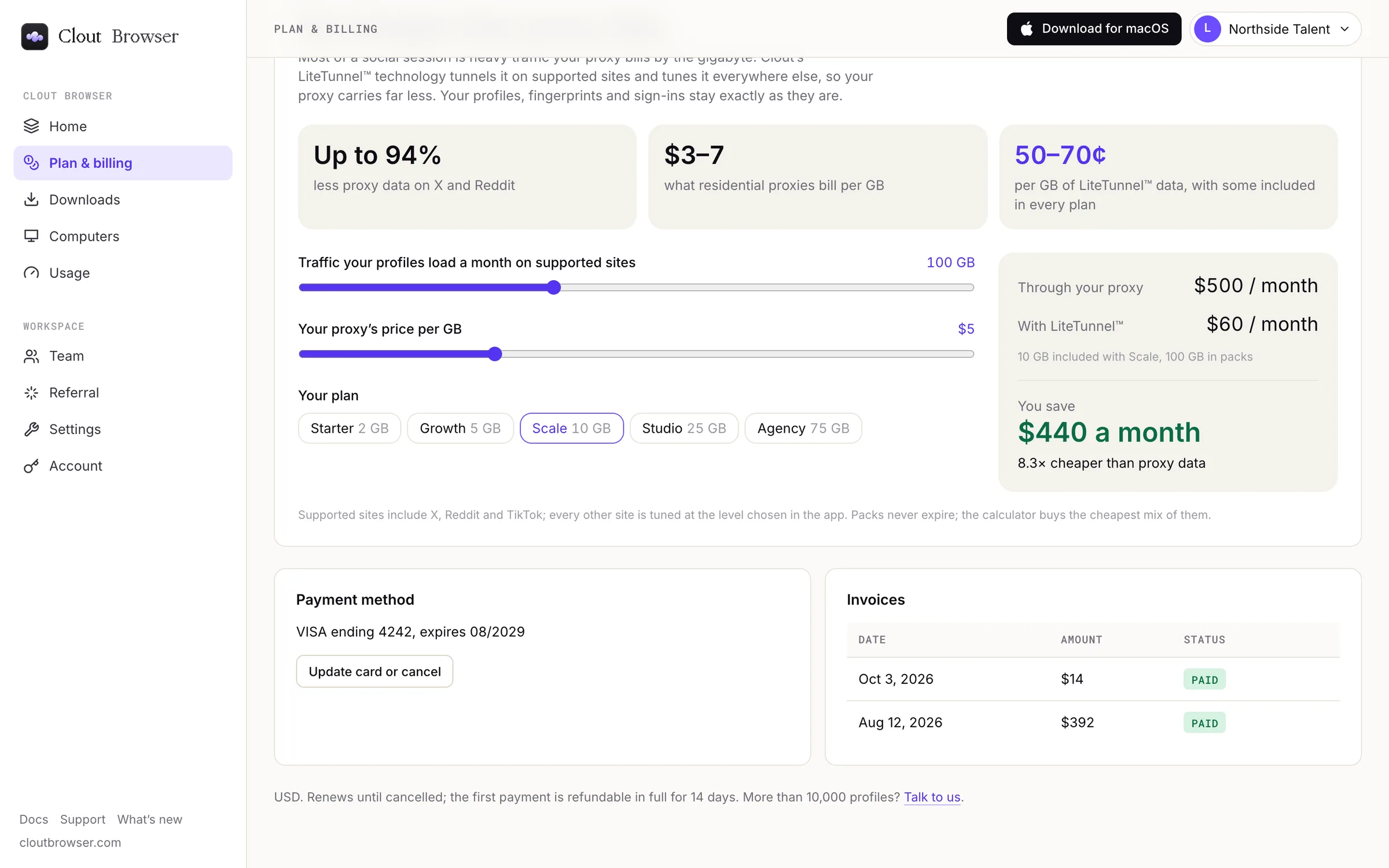
Invoices lists each invoice's date, amount and status. Download the invoices themselves from Stripe's customer portal.
Cancel or keep renewal
Select Update card or cancel to open Stripe's customer portal and stop renewal. Your plan continues to the end of the paid period. Home then shows Your plan ends on with the date. Keep my plan takes you back to Plan & billing, where Update card or cancel lets you resume it before that date.
Failed payments
If a renewal payment fails, update the card through Cards and invoices. Changes are refused while the subscription is past due; reading stays available during the seven-day grace period. Check Plan & billing after correcting the payment.
Refunds
The refund policy offers a full refund if you ask within 14 days of your first payment. It also explains later cancellations, used LiteTunnel™ packs and faults on our side. Talk to us from the account you signed in with and say which payment you mean.